Microsoft 365 management, right inside Cloudbridge
Cloudbridge now connects directly to your customers' Microsoft 365 tenants, so you can manage users and licences in the same place you order and bill them. The new Microsoft 365 capabilities live in the Microsoft CSP area and are rolling out to partners in a guided pilot this month.
Tenants. Connect a customer's Microsoft 365 tenant in a few clicks and see every connected customer in one list, with connection health and GDAP status at a glance.
Users. A Users tab on each customer page lists the customer's Microsoft 365 users with their assigned licences. You can assign or remove licences and block sign-in for a user directly from Cloudbridge.
Real licence usage. Once a tenant is connected, licence counts and usage come straight from Microsoft 365. This gives you an accurate picture of what is deployed versus what is purchased.
Migration insights. An insight card shows customers whose Microsoft licences at another provider are approaching renewal, so you can switch them to Microsoft CSP from Gridheart at the right moment. Choose switch at renewal or request a licence transfer, and Gridheart handles the rest.
Backup gap insight. For customers with Microsoft 365 connected, the Microsoft 365 backup card now uses real tenant data to show exactly which mailboxes and sites are unprotected.
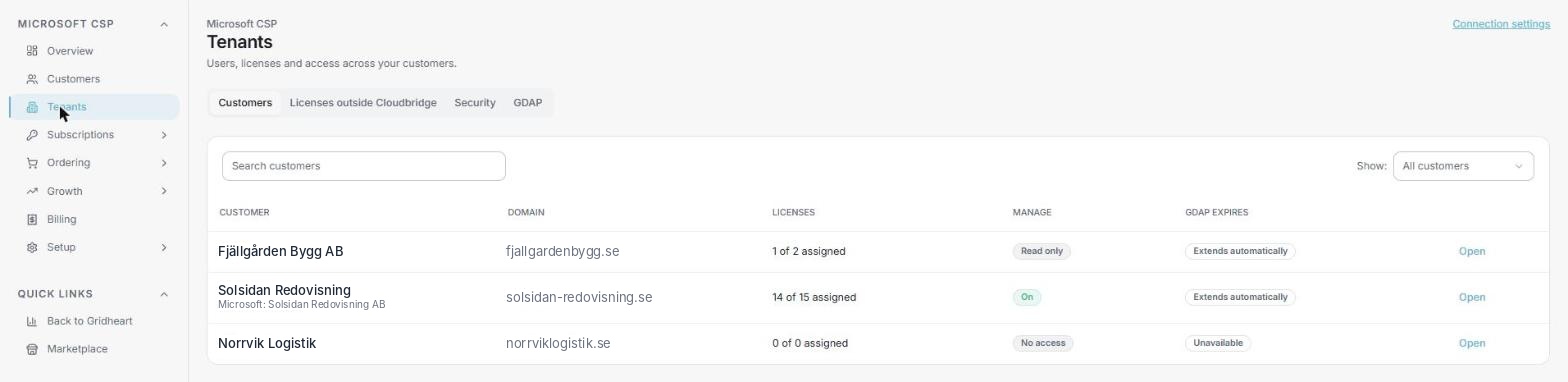 Tenants in the Microsoft CSP area: every connected customer with licence counts, manage status and GDAP.
The Microsoft 365 module is open to all partners, including those who do not yet buy Microsoft CSP through Gridheart. If you only connect Microsoft 365, you see the Microsoft 365 functions in the Microsoft CSP area and nothing else. Want to be part of the pilot? Reach out to your Gridheart contact.
Manage the whole Acronis lifecycle
You can now offboard Acronis services and customers from Cloudbridge, not only onboard them. The new Manage Acronis panel on the customer page covers the full lifecycle.
Remove a service. Switch off a single Acronis service for a customer, for example Advanced Backup or Disaster Recovery, while the rest keeps running.
Suspend a tenant. Pause a customer's Acronis tenant without deleting anything, for example during a payment dispute or a planned migration.
Delete and restore. Delete a tenant immediately when a customer leaves, with a Restore option available for 30 days in case plans change.
Every action is carried out directly against Acronis and reflected in your billing, so what you see in Cloudbridge is always what the customer actually has. Acronis PayGo partners get this out of the box, and partners on an Acronis commit agreement connect their own Acronis API key once to get the same controls.
The Acronis Cyber Protect Cloud area also got a fresh selling overview. The cleaner layout shows live protection counts per customer, so you can see at a glance where backup, DR or security is missing and where the next conversation should be.
Your prices, in your systems and your AI assistant
The Partner API now includes a price list endpoint, so your own quoting, PSA or billing tools can read your buy prices, sell prices and margins per product straight from Cloudbridge. For Microsoft CSP, it returns the licences you actually sell by default, with an option for the full catalog, and customer-specific prices are included. All prices come in your invoice currency at the same exchange rate as your invoice, so there are no surprises at month end.
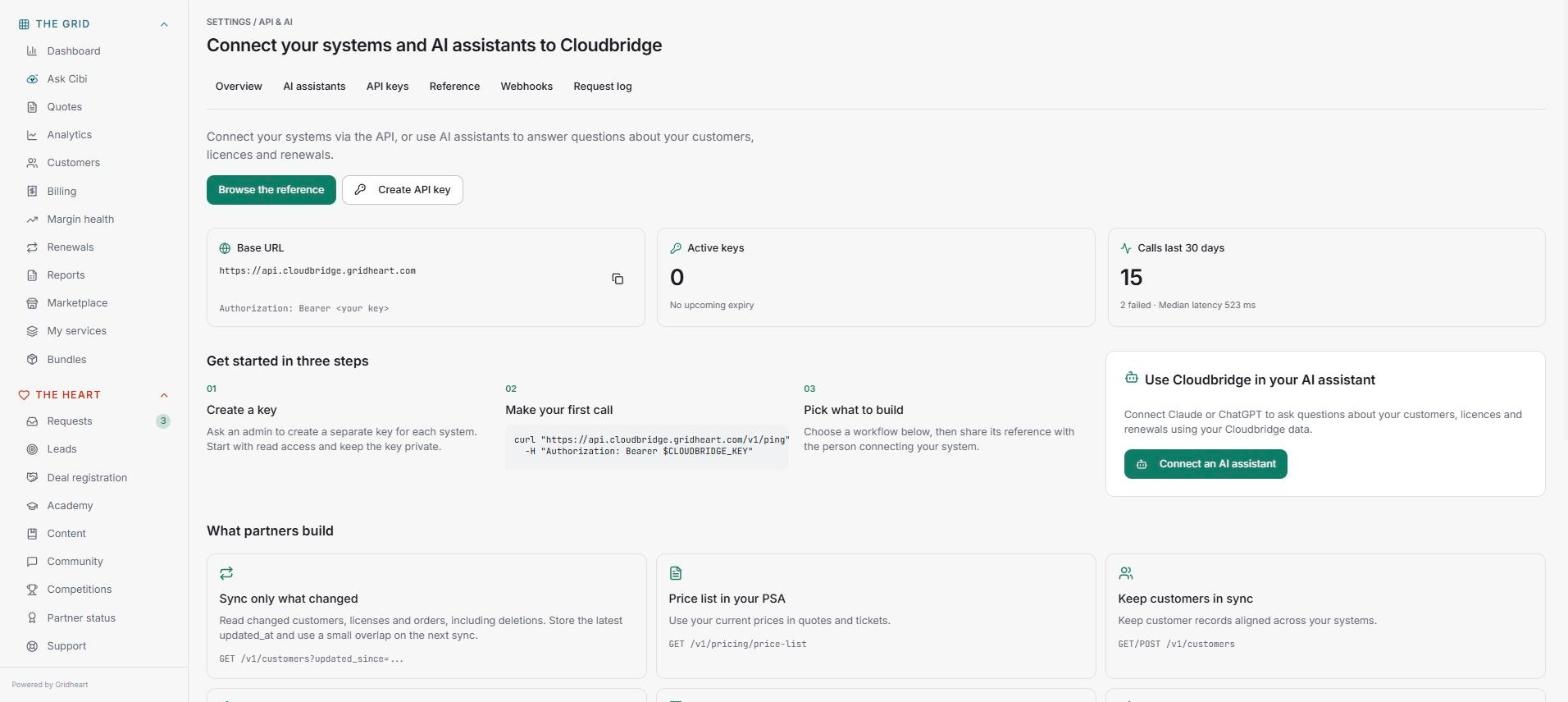 The new API & AI section: base URL, keys, reference, webhooks and request log in one place.
Alongside the price list, the API gained webhooks for order and subscription events and richer field descriptions throughout. It now also answers on a Gridheart address: api.cloudbridge.gridheart.com. API keys, documentation and access settings are gathered in a new API & AI section under Settings, with base URL, keys, reference, webhooks and request log in one place.
AI assistant access is the newest addition. Partners can soon connect Cloudbridge to Claude, ChatGPT or Microsoft Copilot and ask questions in plain language, such as which customers are up for renewal next month or where Microsoft 365 backup is missing. Users sign in with their ordinary Cloudbridge login, and a partner admin decides whether the feature is on. It is in pilot now and opens to more partners over the coming weeks.
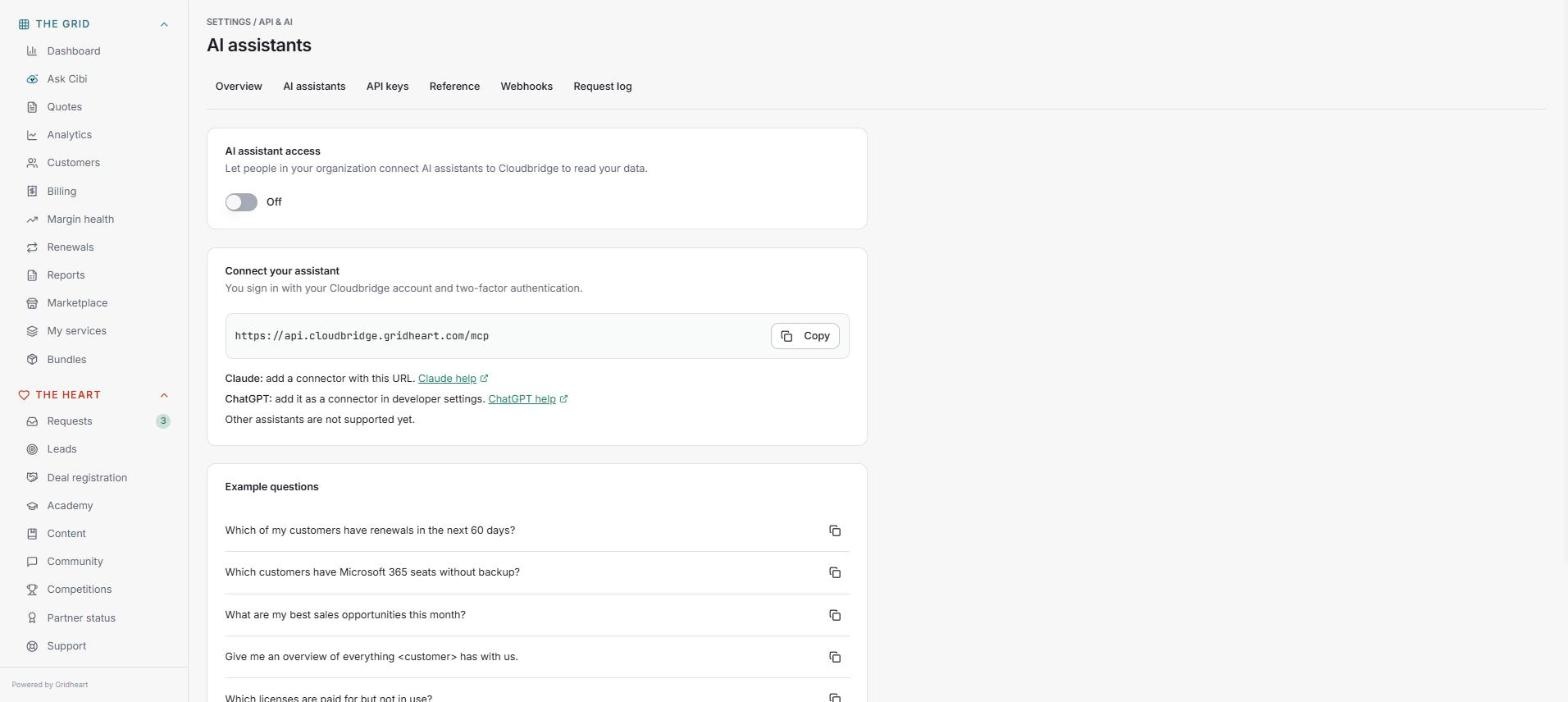 AI assistants: turn on access, connect Claude or ChatGPT and start with example questions.
Polished pages and smaller improvements
One structure for every vendor. All vendor areas now share the same layout: a collapsible left menu with clear groups (overview, customers, licences, pricing, settings) instead of functions hidden in tabs. The Microsoft CSP customer page was redesigned first, and the Datto, NinjaOne SaaS Backup and Bitdefender areas each got a new selling overview showing which customers use what, and where the upsell is.
Pricing pages rebuilt. The partner Pricing page has a new, consistent design across all services, showing what you bill, what you keep and your margin per service. Datto, NinjaOne SaaS Backup, Bitdefender, Keeper and uSecure now use the same price engine as Acronis and Microsoft CSP: set a default margin, override per customer, and see the resulting end-customer price in your currency. Azure Plan pricing works the same way.
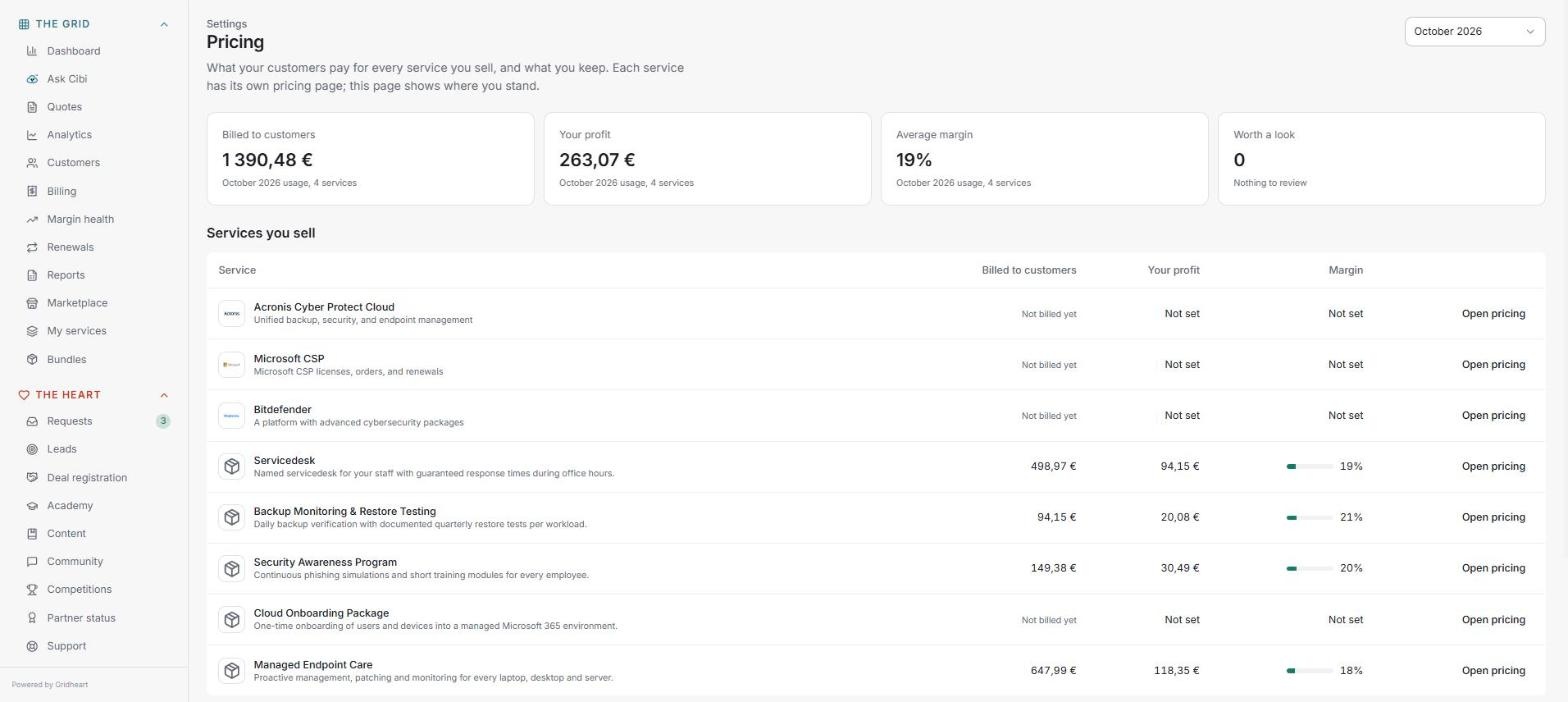 The rebuilt Pricing page: what you bill, what you keep and your margin per service.
Exchange rates, made simple. A new read-only Exchange rates page shows your invoice currency and the locked rate for each month. Every amount you see in Cloudbridge, from the customer portal to the billing preview, now uses the same rate as your invoice.
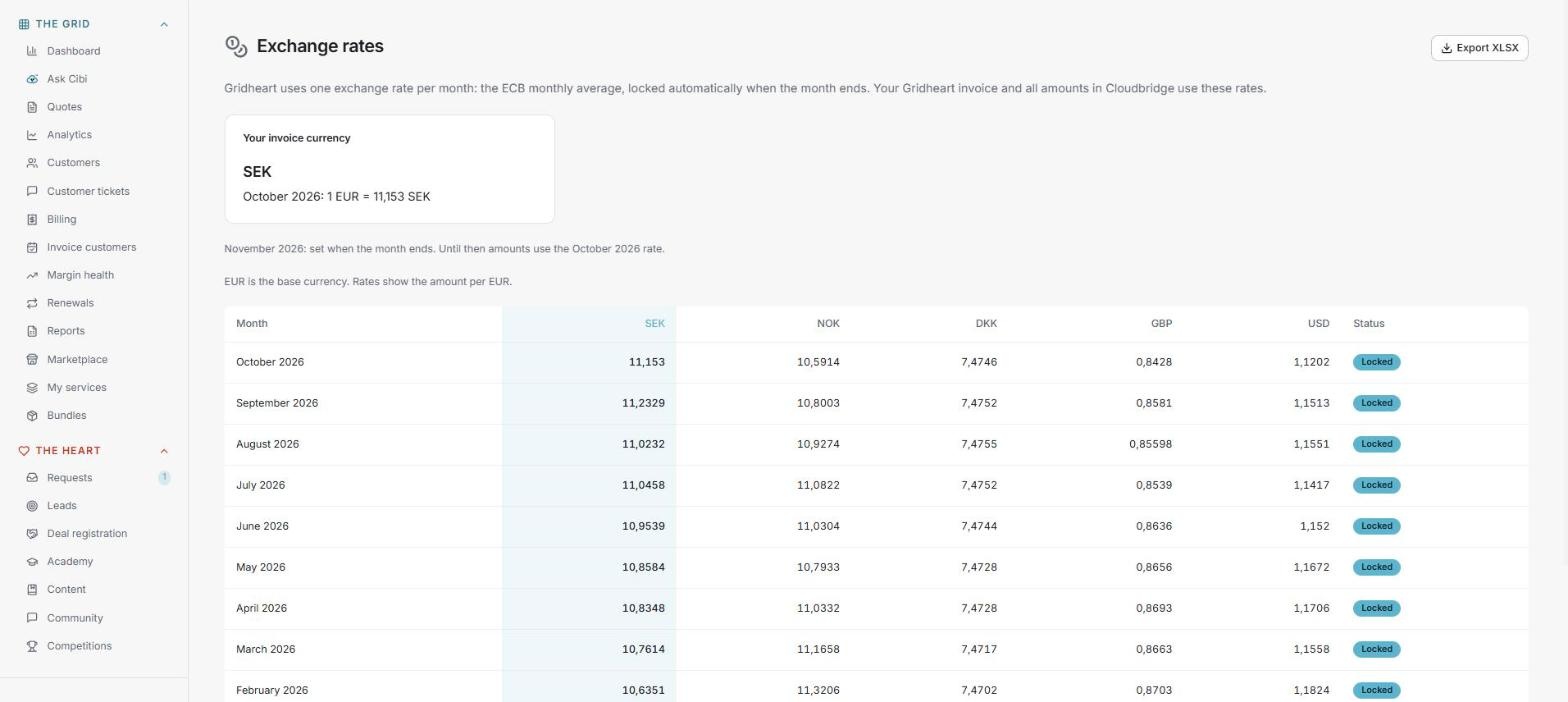 Exchange rates: your invoice currency and the locked rate per month
Cibi reads your screenshots. When you attach a screenshot to a support ticket, Cibi, the Cloudbridge support assistant, now opens and reads it. Her first answer takes the error message or screen you are looking at into account.
Customers created for you. When a vendor reports an end customer that does not yet exist in Cloudbridge, it is now created automatically and mapped, for uSecure and Acronis as well as for Keeper and Microsoft CSP. Likely matches to an existing customer are shown as suggestions for you to confirm.
Smoother Microsoft CSP orders. Orders are validated when you place them, so anything you can fix yourself (a missing domain, incomplete customer details, a reseller relationship not yet accepted) comes straight back to you with a clear message and a resubmit button. Cloudbridge suggests the reseller relationship link and you confirm it, with no waiting on Gridheart.
Deal registration. Registered deals now carry an expected close date, which feeds your pipeline view and AI insights.
Partner status card. The status card on the dashboard has a fresh look, showing your partner tier, progress to the next tier and what to do next.
Not using Cloudbridge yet?
Cloudbridge is rolled out to partners by personal invitation. Contact your Gridheart account manager or our sales team to get started, or to book a walkthrough of this week's features.